"Pharmacy Walk-In Orders & OTC Sales"
Last updated: 21 August 2026
2 min read
Pharmacy Walk-In Orders & Over-The-Counter Sales
The Pharmacy Walk-In feature in EMR Ghana allows dispensary staff to process medication sales directly to walk-in customers without creating a hospital patient folder or paying OPD registration fees.
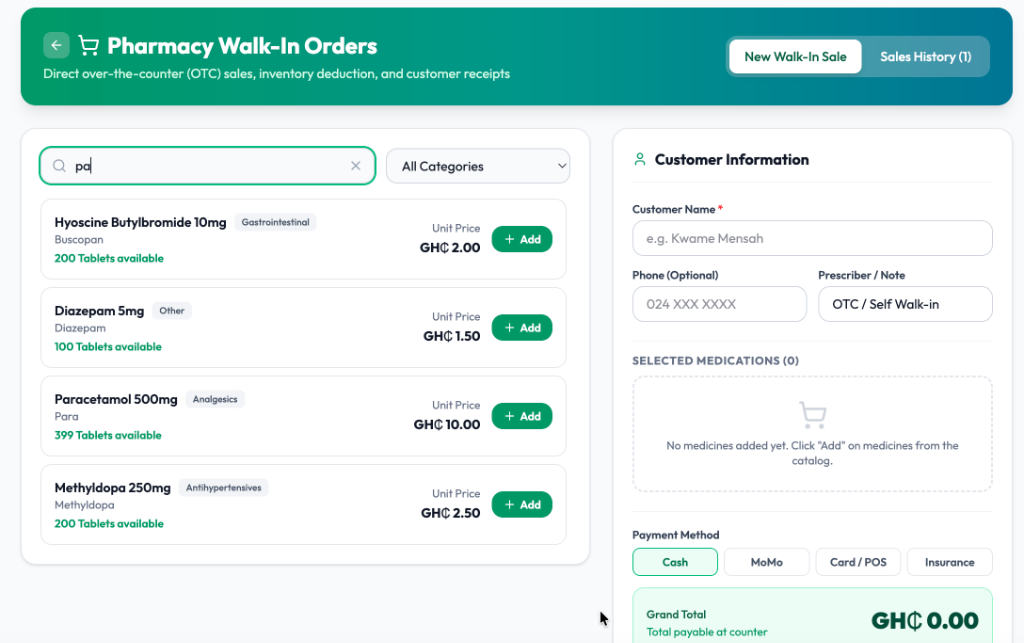
The Walk-In Sales Interface
Step-by-Step Walkthrough
1. Navigating to Walk-In Orders
- Open the main sidebar navigation.
- Select Pharmacy / Inventory → Walk-In Orders (or click the cart icon in the top header).
2. Searching & Adding Medications
- In the search bar, type the name of the drug (e.g.
Paracetamol,Hyoscine,Diazepam,Methyldopa). - The search results display:
- Generic and Brand Name
- Therapeutic Category (e.g. Analgesics, Antihypertensives, Gastrointestinal)
- Available Stock Count (e.g.
200 Tablets available) - Unit Price in Ghana Cedis (GH₵)
- Click the green + Add button to place items in the customer's cart.
3. Entering Customer Details (Optional)
- Customer Name: Enter the customer's name (e.g.,
Kwame Mensah). - Phone (Optional): Useful for SMS receipts and transaction records.
- Prescriber / Note: Default is
OTC / Self Walk-inor enter an external doctor's name.
4. Selecting Payment Method & Checkout
Choose the customer's preferred payment channel:
- Cash: Enter amount tendered to compute change.
- MoMo: Log transaction reference for MTN MoMo, Telecel Cash, or AT Money.
- Card / POS: Record bank POS reference.
- Insurance: Route for private health insurance co-payments.
5. Instant Stock Deduction & Receipt
Upon clicking Complete Walk-In Sale:
- Stock is deducted immediately based on First-In, First-Out (FIFO) batch tracking.
- An itemized thermal receipt is generated and can be printed to any 58mm or 80mm POS printer.